Skip to content
Obserya

Local on Windows · Developed by CoreWeb Studio

Local website audit software for technical SEO and AI readiness

Obserya audits a site on your own machine and ties every finding to the affected page and the value found there. The result is an action plan for the client and for the people doing the work.

  • Analysis runs locallyNo cloud, no account
  • Findings carry evidenceAffected page and value found
  • Results you can hand overClient report and technical exports
Technical SEO on the left, both scores in the centre, AI readiness on the right.Local OnlySQLite · localWindows desktop
  • Technical SEO7 core areas, each scored
  • AI readiness6 dimensions as a signal map
  • FindingsSorted by severity

The application interface is currently in German. Screenshots on this page show it as it is.

What is Obserya?

Obserya is website audit software built by CoreWeb Studio for Windows. It crawls a site locally, scores technical SEO and AI readiness on two separate axes, and backs every finding with the affected page and the value found there. From that it produces a prioritised action plan, a PDF client report and technical exports.

Why Obserya exists

The gap sits between the crawl result and the handover.

An audit score describes a state but assigns nobody any work. Which page is affected and who tackles what first is settled by hand after the crawl. Obserya pulls that into the analysis.

  1. Metric

    A number with no address

    The value moves. The pages behind it stay invisible.

  2. Finding

    The finding gets its pages

    The displayed count opens the URLs behind it.

  3. Evidence

    The value found is attached

    For a broken link, the target and anchor text as found.

  4. Action

    With an owner and a first step

    Ranked by effort and impact, ready to hand over.

Obserya replaces neither an enterprise crawler nor keyword research. It covers the stretch in between, where signals turn into ranked work packages.

How Obserya works

From a URL to an action plan you can hand over.

Each step carries the previous step’s data forward — so any finding traces back to its source.

  1. Local crawl

    The site is captured on your own machine.

    Obserya fetches and parses pages while following internal links. The result is a page inventory with HTML, metadata and status codes.

    • Crawl engine
    • Fetcher and parser
    • Internal link graph
  2. Page classification

    A legal notice is not judged like a service page.

    Every page is assigned a role. A missing meta description weighs differently on a utility page than on a service page.

    • Service pages
    • Content pages
    • Utility and legal pages
  3. Analysis layers

    Two axes, scored separately.

    Technical SEO and on-page on one side, AI readiness and GEO signals on the other — with no third number blending the two.

    • Indexability and linking
    • Metadata and page structure
    • Answer clarity and extractability
  4. Evidence-based findings

    Every finding carries its proof.

    A finding consists of the affected page, the issue and the value found. Where no location can be established, the report says so.

    • Affected URL
    • Value found
    • Evidence quality
  5. Prioritisation

    Order comes from effort, impact and evidence.

    What can be tackled straight away is kept apart from what needs verifying — each with an owner and a first step.

    • Impact and effort
    • Owner
    • Verification flagged
  6. Reports and exports

    Results leave the tool in a usable form.

    The client report explains the state without SEO vocabulary; the exports pass the same data to the implementation team.

    • PDF client report
    • Technical exports
    • Report generator

The workflow as a diagram

Tap a step.

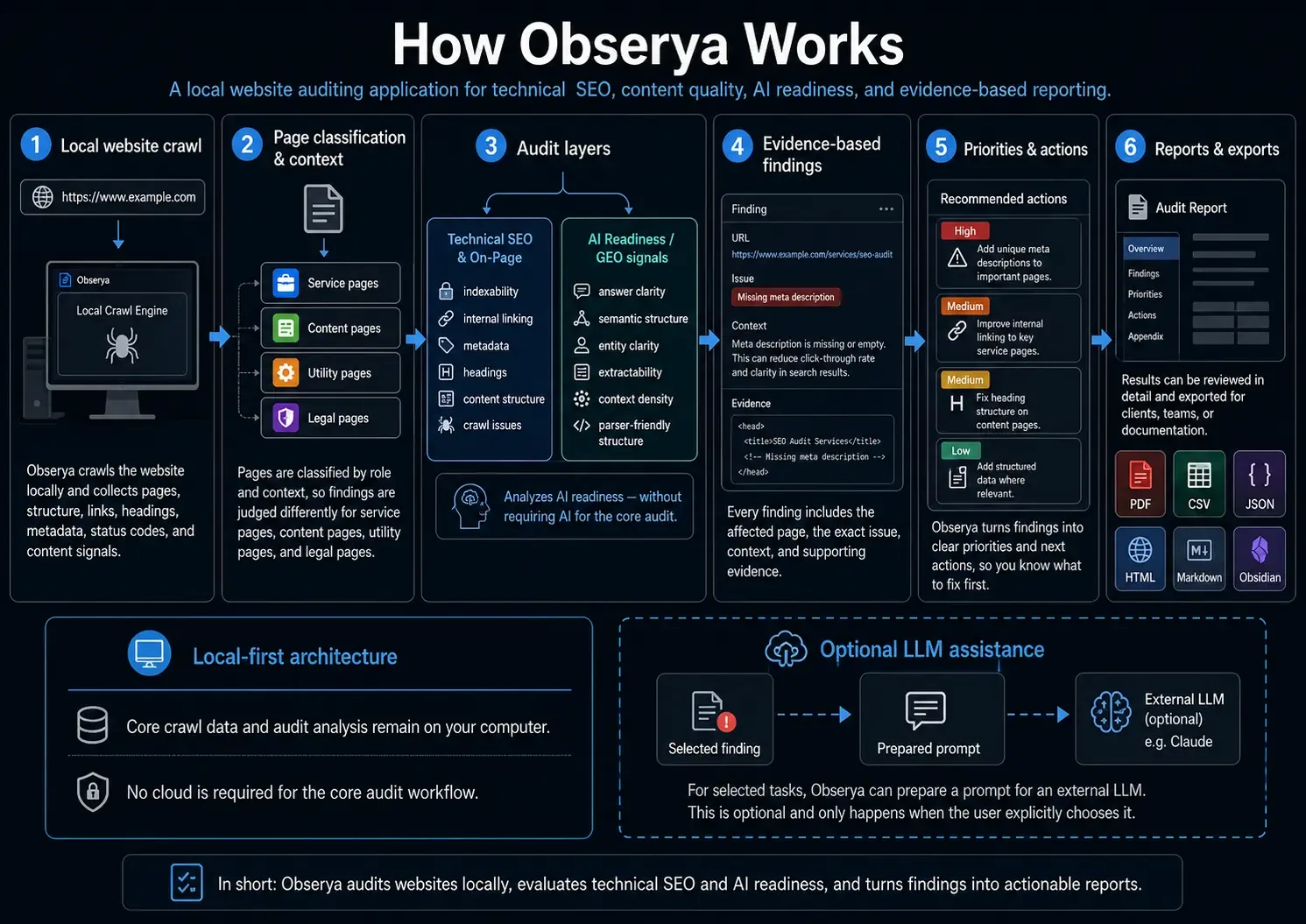
Workflow diagram “How Obserya Works” with six steps from the local crawl through to reports and exports.

Full workflow

How Obserya Works: six steps from the local crawl through to reports and exports, with the local-first architecture and optional LLM path below.

Tap a step.

What Obserya checks

Two scoring axes that lead to different work.

Technical SEO describes the foundation for classic search, AI readiness how well the same page reads as an answer source.

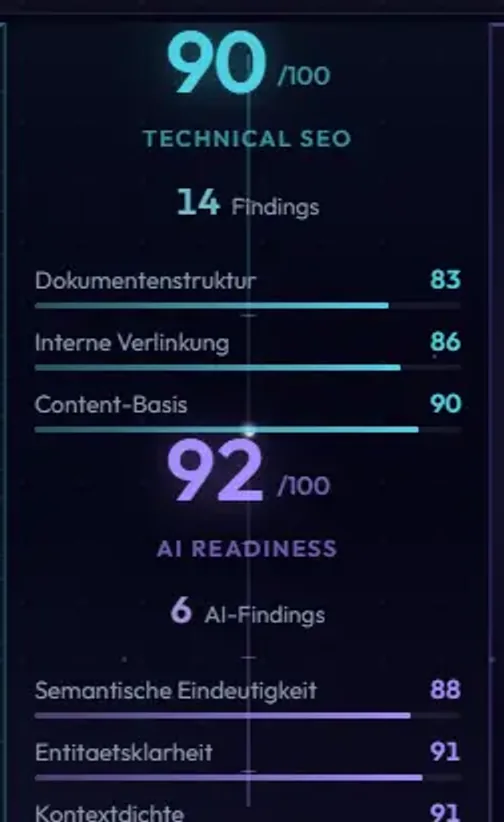
Score column of the dashboard with the technical SEO score and AI readiness score stacked separately.

Why there is no third score

A page can be technically sound and still be hard to use as an answer source. An average would hide that difference.

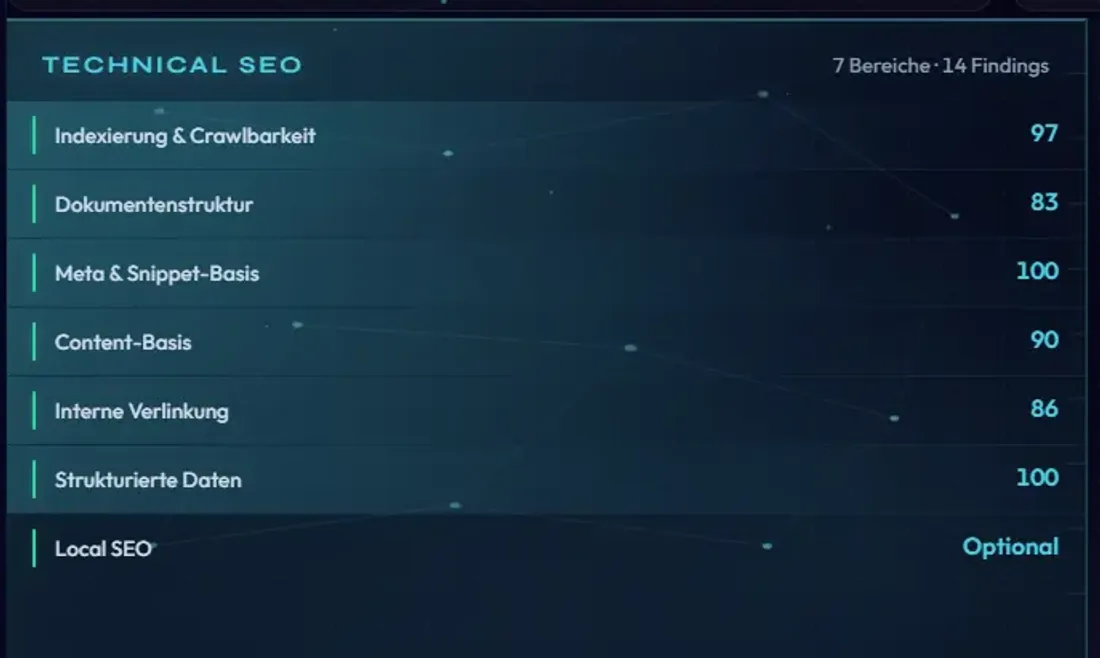
Technical SEO area of the dashboard with the seven core areas and Local SEO as an optional block.

Technical SEO

Visibility foundation for classic search

7 core areas
  1. Indexing and crawlabilityrobots.txt, sitemap, meta robots, redirect chains and loops, canonicals.
  2. Document structureHeading levels without gaps, real semantic regions.
  3. Meta and snippet basicsTitle and meta description: present, long enough, useful.
  4. Content basicsContent substance, near-empty pages, similarity between project pages.
  5. Internal linkingBroken targets, non-functional links, inbound links, orphan warnings.
  6. Structured dataExisting schemas, including schema that does not match the page type.
  7. Images and page elementsMissing alt text in content context, decorative images excluded.

Local SEOOptional

Local signals run as an optional block at project level; a full area is still ahead.

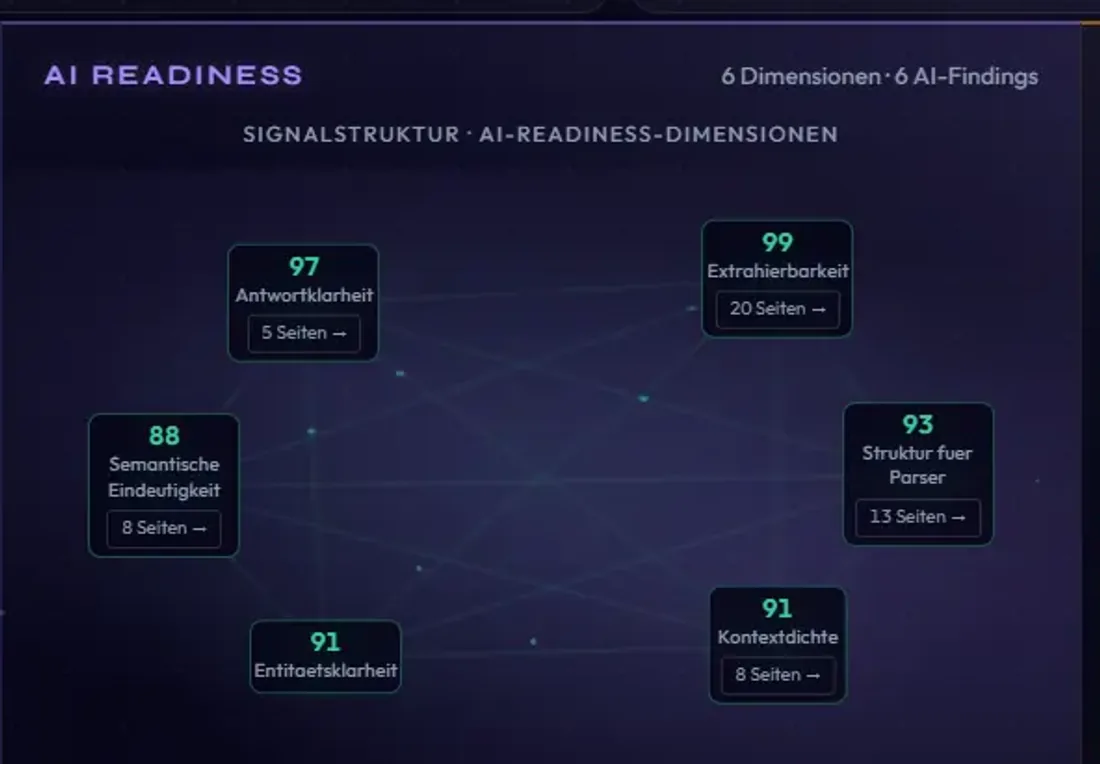
AI readiness area of the dashboard with six dimensions shown as a connected signal map.

AI readiness

Usability as an answer source

6 dimensions
  1. Answer clarityDoes the key statement appear early enough to be quoted?
  2. ExtractabilityCan the core content be lifted out of the layout?
  3. Semantic clarityReal semantic regions, or only generic containers?
  4. Parser-friendly structureAre order, levels and section boundaries machine-readable?
  5. Entity clarityIs it clear which company and which service the page is about?
  6. Context densityDoes the page carry context of its own?

Findings and evidence

A finding with an address, proof and a next step.

Six findings from a demo audit. The technical key appears the same way in the exports.

Select a finding

Finding types and actions match the application; quantities come from the demo audit.

Technical SEO · Internal linking

Empty or non-functional link

Links lead nowhere: an empty target, a bare hash, or a script call.

Affected
11 links on the page
Captured per occurrence
The link target and the anchor text as found.
Action
Set a valid target, or mark the element up as a button.

Sufficiently evidencedAffects the score
The filtered list on the left, the selected finding on the right.

Evidence quality and urgency are two different things

A finding whose evidence only partly holds up is filed under “verify first” rather than in the immediate list.

Prioritisation and drilldowns

What comes first, and who picks it up.

Obserya ranks findings by impact, effort and evidence quality, and shows its working.

Score class

Where the measured value sits on the scale.

A project scoring 91 falls into the “Good” class.

Action status

Whether evidenced findings are still open.

That same project can still carry confirmed work.

Both appear separately in the report and are easily confused.

Feasibility classes

The labels come from the report and describe how quickly something can be picked up — not deadlines.

  1. Low effort

    This week

    Well evidenced and actionable without further checks.

  2. More effort

    This month

    Clear in substance, heavier to implement.

  3. Check before acting

    Verify first

    Evidenced, but worth confirming manually once.

Score classes

0–60
Significant work needed
61–75
Needs improvement
76–85
Solid
86–95
Good
96–100
Very good

Bar width matches the value range: “Very good” covers five points, “Significant work needed” covers sixty-one.

From project to occurrence

  1. ProjectOverview

    Both scores, all areas, the overall count.

  2. AreaInternal linking

    One analysis area with its value and findings.

  3. Findingempty_or_nonfunctional_link

    The issue with its cause, action and affected pages.

  4. PageOccurrence

    The specific URL with the value found there.

Every level stays navigable.

Findings strip from the project overview, each card showing severity, channel, technical key and the number of affected URLs.
Findings on legal and utility pages are marked as not affecting the score.

Local-first architecture

The audit runs on your machine.

Crawl, analysis, scoring and report generation all run locally; audit data sits in a database on the device.

On your machine
  • Crawl
  • Analysis
  • Scoring
  • Findings and evidence
  • Report and export generation
  • Local database

Only the crawl of the target site needs network access.

Optional

Leaves the device only when triggered

  • External LLM (opt-in, per task)
  • The whole chain stays on the device

    From page capture through to the finished report.

  • Audit data stays on the device

    Crawl and page data, findings, evidence and project settings.

  • No service in between

    The core workflow needs no account and no API key.

  • Sending data out is a decision

    Whether anything leaves is decided by the user, per task.

Where each step happens

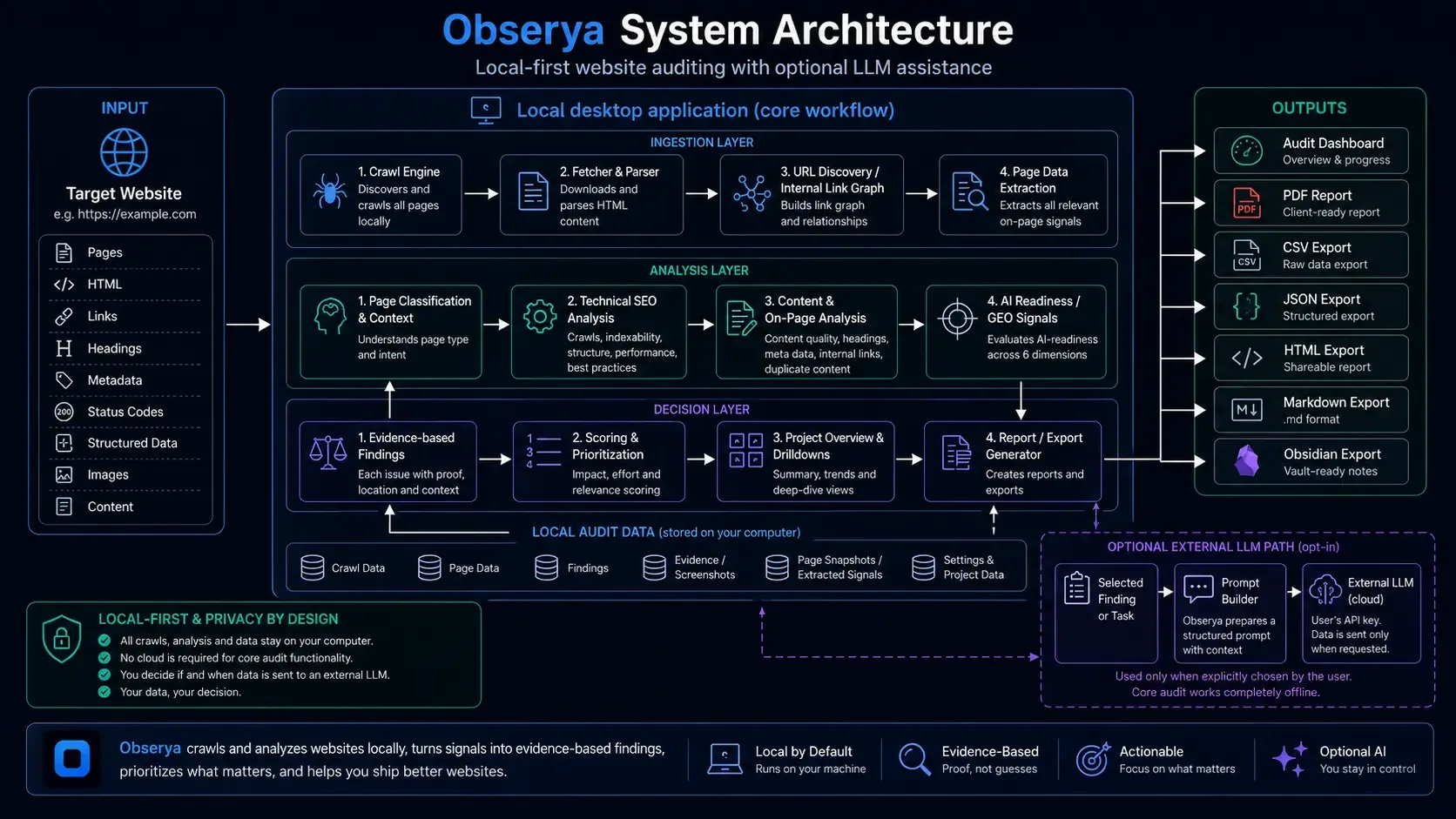
Everything inside the large block runs in the application. Only the dashed path at the bottom right leaves the device.

Architecture diagram “Obserya System Architecture” with input, the local desktop application, outputs and the optional LLM path.

Full view

Obserya System Architecture: input signals, the local application with its ingestion, analysis and decision layers, local audit data, outputs and the optional LLM path.

Select a section.

Optional AI assistance

The audit core runs without generative AI.

Crawl, analysis and scoring are rule-based. No language model contributes to scores or core findings, which keeps results reproducible in a client meeting.

This is why Obserya is not positioned as an AI tool.

  1. Audit coreRuns self-contained on the device.
  2. Pick a taskThe user decides what for.
  3. Build a promptStructured, with context.
  4. External LLMOnly this step leaves the device.

Three stages run locally, only the last one leaves the device.

  • Off by default

    Audits, reports and startup all work without a language model.

  • One task, one prompt

    A selected task produces a structured prompt with context.

  • The user triggers it

    A call happens only when it is initiated.

  • Additive, never scoring

    A result may add suggestions. Scores and core findings stay untouched.

Client reports and exports

Two audiences, one audit state.

The client report explains the state in plain language and separates confirmed work from open checks.

  1. 01

    Audit state

    Pages, findings, evidence and scores.

  2. 02

    Prioritisation

    Impact, effort and evidence quality set the order.

  3. 03

    Report pages

    Summary judgement, status and action plan.

  4. 04

    Output

    PDF for the client, CSV and JSON for the work ahead.

Status at a glance
Plan by feasibility
Plan by priority

Swipe · tap for the full page

Summary judgement
A paragraph on the overall state — a good score does not mean everything is done.
Status at a glance
Overall state, acute risk, visibility risk, AI legibility and immediate items, each with a traffic-light label.
Plan by feasibility
Three classes based on effort, impact and evidence.
Plan by priority
A table with an owner and a first step for each action.

One audit state, two audiences

The same findings, keys and evidence — once as a report, once as a file.

For the client

  • PDFClient reportWritten to be read, ready to hand over.
  • HTMLShareable reportThe same report as a web document.

For the implementation team

  • CSVWorking dataFindings and redirects for your own analysis.
  • JSONRaw dataThe complete audit state, machine-readable.
  • MDMarkdownFor documentation and knowledge bases.
  • ObsidianVault exportInto an Obsidian-compatible folder structure.
Available outputs, status and export actions.

What this changes day to day

  • The client reads a report that needs no translating.
  • The implementation team keeps the data workable.
  • Audits stay documented and comparable.
  • Anything still to be checked is marked as such.

Where it fits

What Obserya was built for.

A working tool for recurring audits. Six situations from practice.

Taking on a new client site

  1. 01Starting point

    A new site arrives, and a proposal depends on that first assessment.

  2. 02With Obserya

    Create the project, crawl locally, run the audit.

  3. 03Outcome

    A PDF for the client meeting, a CSV for the estimate.

Built for

The focus is on small and mid-sized agencies with recurring audit work.

  • Web design agencies
  • SEO agencies
  • Digital agencies
  • Freelance web designers
  • SEO freelancers
  • Technical SEO specialists
  • In-house web and marketing teams

Development status

What is built, and what is still being worked on.

Obserya is developed at CoreWeb Studio as an in-house audit tool, tested against real client projects.

What is already built

  • Local crawl with page inventory and link graph
  • Page classification by role and context
  • Technical SEO across seven core areas, with Local SEO optional
  • AI readiness across six dimensions
  • Evidence-based findings, deterministic scoring on two axes
  • PDF client report plus CSV, JSON, HTML, Markdown and Obsidian exports

What is still in development

  • Delivery as an installer, including an update path
  • Full JavaScript rendering during the crawl
  • Exchanging project data between installations
  • Local SEO as a full area in its own right
  • An extended AI layer with its own review stage

Planned, and not available today.

Current limits

  • The AI readiness score is an indicator; an externally validated model is outstanding.
  • Content that only appears in the browser is missed without full JavaScript rendering.
  • There is no independent external review of result quality.

No reliable statement can be made about release date, pricing or distribution.

Common questions

Answered directly.

These answers describe the current development status.

What is Obserya?

Website audit software built by CoreWeb Studio for Windows. It crawls locally, scores technical SEO and AI readiness separately, and backs every finding with the affected page and the value found. Output: an action plan, a PDF client report and technical exports.

Does the analysis run locally?

Yes. Crawl, analysis, scoring and report generation run in the desktop application, and audit data stays in a local database. Only the crawl needs network access.

Is AI used for crawling, analysis or scoring?

No, those three steps are rule-based. Optional LLM assistance applies only to a selected task and changes neither scores nor core findings.

What do technical SEO and AI readiness check?

Technical SEO covers seven core areas: indexing and crawlability, document structure, meta and snippet basics, content basics, internal linking, structured data, and images and page elements; Local SEO runs alongside as an option. AI readiness scores six dimensions on its own axis, from answer clarity through to context density.

How do findings and evidence work?

A finding names the affected pages and the value found — for a broken link, the target and anchor text. Where evidence only partly holds up, Obserya flags it for verification.

Which reports and exports are produced?

A client report as PDF, plus HTML as a shareable report, CSV for working data, JSON as a raw export, Markdown, and an Obsidian-compatible export.

Who is Obserya for?

Primarily small and mid-sized web, SEO and digital agencies handing audit results to clients and implementation teams. Freelancers and in-house teams too.

What is the development status, and is Obserya publicly available?

Obserya is developed and used internally at CoreWeb Studio. The audit core, reports and exports are built; the installer, full JavaScript rendering and a standalone Local SEO area are in progress. There is no public access, sign-up or download.

Obseryaby CoreWeb Studio

Audits you can back up.

Obserya comes out of day-to-day audit work at CoreWeb Studio — where crawl data has to turn into something a client will read and a team can work through.